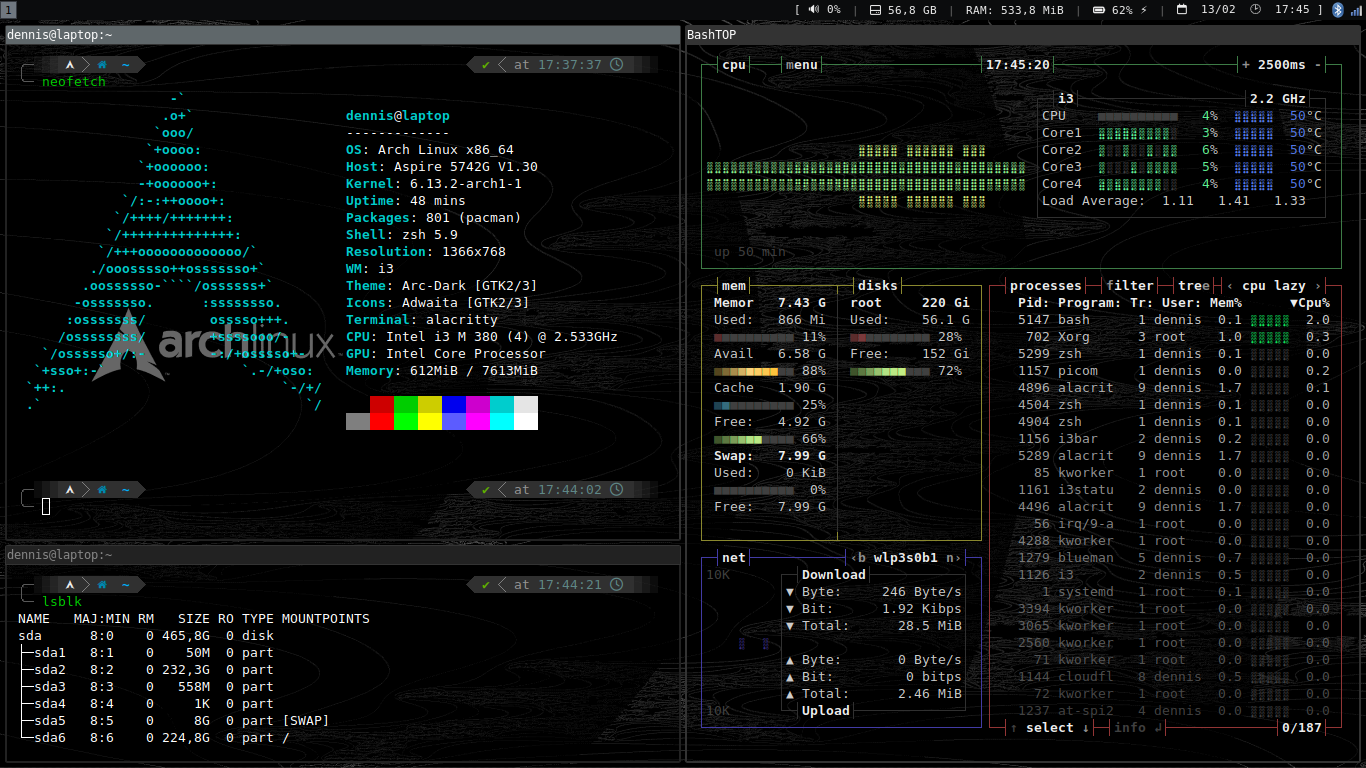
Configurazione i3:
set $mod Mod4
# Cursor warp fix
mouse_warping none
# No screensaver
exec_always --no-startup-id xset s off
exec_always --no-startup-id xset -dpms
# Brightness (laptop)
bindsym XF86MonBrightnessUp exec --no-startup-id brightnessctl set +2%
bindsym XF86MonBrightnessDown exec --no-startup-id brightnessctl set 2%-
# Bluetooth
exec --no-startup-id blueman-applet
# Gaps
gaps inner 4
gaps outer 1
# Numlock on
exec_always --no-startup-id numlockx on
# Wallpaper
exec_always --no-startup-id feh --bg-scale /home/dennis/Immagini/Sfondi/black.png
# Borders
default_border normal
default_floating_border normal
# Program shortcuts
bindsym $mod+b exec --no-startup-id firefox
bindsym $mod+c exec --no-startup-id code
bindsym $mod+n exec --no-startup-id thunar
# Keyboard layout (IT, RU)
exec_always --no-startup-id "setxkbmap -layout it,ru -variant , -option grp:ctrl_alt_toggle"
# Font for window titles. Will also be used by the bar unless a different font
# is used in the bar {} block below.
font -misc-fixed-medium-r-normal--13-120-75-75-C-70-iso10646-1
font pango:DejaVu Sans Mono 12px
exec --no-startup-id dex --autostart --environment i3
exec --no-startup-id xss-lock --transfer-sleep-lock -- i3lock --nofork
exec --no-startup-id nm-applet
# Use pactl to adjust volume in PulseAudio.
set $refresh_i3status killall -SIGUSR1 i3status
bindsym XF86AudioRaiseVolume exec --no-startup-id pactl set-sink-volume @DEFAULT_SINK@ +2% && $refresh_i3status
bindsym XF86AudioLowerVolume exec --no-startup-id pactl set-sink-volume @DEFAULT_SINK@ -2% && $refresh_i3status
bindsym XF86AudioMute exec --no-startup-id pactl set-sink-mute @DEFAULT_SINK@ toggle && $refresh_i3status
bindsym XF86AudioMicMute exec --no-startup-id pactl set-source-mute @DEFAULT_SOURCE@ toggle && $refresh_i3status
# Use Mouse+$mod to drag floating windows to their wanted position
floating_modifier $mod
# move tiling windows via drag & drop by left-clicking into the title bar,
# or left-clicking anywhere into the window while holding the floating modifier.
tiling_drag modifier titlebar
# start a terminal
bindsym $mod+Return exec --no-startup-id alacritty
# kill focused window
bindsym $mod+Shift+q kill
# start dmenu (a program launcher)
bindsym $mod+d exec --no-startup-id dmenu_run
# change focus
bindsym $mod+j focus left
bindsym $mod+k focus down
bindsym $mod+l focus up
bindsym $mod+ograve focus right
# alternatively, you can use the cursor keys:
bindsym $mod+Left focus left
bindsym $mod+Down focus down
bindsym $mod+Up focus up
bindsym $mod+Right focus right
# move focused window
bindsym $mod+Shift+j move left
bindsym $mod+Shift+k move down
bindsym $mod+Shift+l move up
bindsym $mod+Shift+ograve move right
# alternatively, you can use the cursor keys:
bindsym $mod+Shift+Left move left
bindsym $mod+Shift+Down move down
bindsym $mod+Shift+Up move up
bindsym $mod+Shift+Right move right
# split in horizontal orientation
bindsym $mod+h split h
# split in vertical orientation
bindsym $mod+v split v
# enter fullscreen mode for the focused container
bindsym $mod+f fullscreen toggle
# change container layout (stacked, tabbed, toggle split)
bindsym $mod+s layout stacking
bindsym $mod+w layout tabbed
bindsym $mod+e layout toggle split
# toggle tiling / floating
bindsym $mod+Shift+space floating toggle
# change focus between tiling / floating windows
bindsym $mod+space focus mode_toggle
# focus the parent container
bindsym $mod+a focus parent
# focus the child container
#bindsym $mod+d focus child
# Define names for default workspaces for which we configure key bindings later on.
# We use variables to avoid repeating the names in multiple places.
set $ws1 "1"
set $ws2 "2"
set $ws3 "3"
set $ws4 "4"
set $ws5 "5"
set $ws6 "6"
set $ws7 "7"
set $ws8 "8"
set $ws9 "9"
set $ws10 "10"
# switch to workspace
bindsym $mod+1 workspace number $ws1
bindsym $mod+2 workspace number $ws2
bindsym $mod+3 workspace number $ws3
bindsym $mod+4 workspace number $ws4
bindsym $mod+5 workspace number $ws5
bindsym $mod+6 workspace number $ws6
bindsym $mod+7 workspace number $ws7
bindsym $mod+8 workspace number $ws8
bindsym $mod+9 workspace number $ws9
bindsym $mod+0 workspace number $ws10
# move focused container to workspace
bindsym $mod+Shift+1 move container to workspace number $ws1
bindsym $mod+Shift+2 move container to workspace number $ws2
bindsym $mod+Shift+3 move container to workspace number $ws3
bindsym $mod+Shift+4 move container to workspace number $ws4
bindsym $mod+Shift+5 move container to workspace number $ws5
bindsym $mod+Shift+6 move container to workspace number $ws6
bindsym $mod+Shift+7 move container to workspace number $ws7
bindsym $mod+Shift+8 move container to workspace number $ws8
bindsym $mod+Shift+9 move container to workspace number $ws9
bindsym $mod+Shift+0 move container to workspace number $ws10
# reload the configuration file
bindsym $mod+Shift+c reload
# restart i3 inplace (preserves your layout/session, can be used to upgrade i3)
bindsym $mod+Shift+r restart
# exit i3 (logs you out of your X session)
bindsym $mod+Shift+e exec "i3-nagbar -t warning -m 'You pressed the exit shortcut. Do you really want to exit i3? This will end your X session.' -B 'Yes, exit i3' 'i3-msg exit'"
# resize window (you can also use the mouse for that)
mode "resize" {
# These bindings trigger as soon as you enter the resize mode
# Pressing left will shrink the window’s width.
# Pressing right will grow the window’s width.
# Pressing up will shrink the window’s height.
# Pressing down will grow the window’s height.
bindsym j resize shrink width 10 px or 10 ppt
bindsym k resize grow height 10 px or 10 ppt
bindsym l resize shrink height 10 px or 10 ppt
bindsym ograve resize grow width 10 px or 10 ppt
# same bindings, but for the arrow keys
bindsym Left resize shrink width 10 px or 10 ppt
bindsym Down resize grow height 10 px or 10 ppt
bindsym Up resize shrink height 10 px or 10 ppt
bindsym Right resize grow width 10 px or 10 ppt
# back to normal: Enter or Escape or $mod+r
bindsym Return mode "default"
bindsym Escape mode "default"
bindsym $mod+r mode "default"
}
bindsym $mod+r mode "resize"
# Floatings
for_window [window_role="About"] floating enable
for_window [window_role="task_dialog|bubble|page-info|Preferences|pop-up"] floating enable
for_window [window_role="Open Files"] floating enable sticky
for_window [window_type="dialog"] floating enable
for_window [window_type="menu"] floating enable
# Sticky windows
for_window [instance="file_progress"] sticky enable
for_window [class="info|Mate-color-select|gcolor2|timesup|QtPass|GtkFileChooserDialog"] sticky enable
# Window focus settings
no_focus [window_role="pop-up"]
# Shutdown, Reboot, Lock Screen and Logout
mode "power" {
bindsym q exec systemctl poweroff
bindsym r exec systemctl reboot
bindsym l exec --no-startup-id i3lock --color=000000, mode "default"
bindsym o exec --no-startup-id i3-msg exit, mode "default"
bindsym h exec --no-startup-id i3lock --color=000000 && systemctl hibernate, mode "default"
bindsym s exec --no-startup-id i3lock --color=000000 && systemctl suspend, mode "default"
bindsym Return mode "default"
bindsym Escape mode "default"
bindsym $mod+backslash mode "default"
}
bindsym $mod+backslash mode "power"
# class border backgr. text indicator child_border
client.focused #333333 #333333 #ffffff #333333 #333333
client.focused_inactive #333333 #5f676a #ffffff #333333 #222222
client.unfocused #333333 #222222 #888888 #333333 #222222
client.urgent #333333 #900000 #ffffff #900000 #900000
client.placeholder #000000 #0c0c0c #ffffff #000000 #0c0c0c
client.background #ffffff
# Start i3bar to display a workspace bar (plus the system information i3status
# finds out, if available)
bar {
font pango:DejaVu Sans Mono 11px
colors {
background #0b0c0d
statusline #eeeeee
focused_workspace #373b41 #707880 #000000
}
status_command i3status
separator_symbol " | "
tray_output primary
position top
}
# Picom
exec_always --no-startup-id picom &
general {
colors = false
interval = 1
}
order += "volume master"
order += "disk /"
order += "memory"
order += "battery all"
order += "tztime local"
volume master {
format = "[ 🔊 %volume"
format_muted = "[ 🔈 %volume"
device = "pulse"
}
battery all {
format = "🔋 %percentage %status"
status_bat = ""
status_full = ""
status_idle = ""
status_chr = "⚡"
status_unk = "?"
path = "/sys/class/power_supply/BAT%d/uevent"
last_full_capacity = true
integer_battery_capacity = true
}
disk "/" { prefix_type = custom
format = "🖴 %used"
}
#disk "/home" {
# prefix_type = custom
# format = "/: %used / %total"
#}
memory {
format = " %used"
#threshold_degraded = "1G"
#format_degraded = "MEMORY < %available"
}
tztime local {
timezone = "Europe/Rome"
format = "📅 %d/%m %H:%M ] "
}
[window]
opacity = 0.6
padding.x = 11
padding.y = 11
decorations = "Buttonless"
[font]
normal = { family = "DejaVu Sans Mono", style = "Regular" }
bold = { family = "DejaVu Sans Mono", style = "Bold" }
italic = { family = "DejaVu Sans Mono", style = "Italic" }
bold_italic = { family = "DejaVu Sans Mono", style = "Bold Italic" }
size = 9
[general]
import = [
"/home/dennis/.config/alacritty/themes/themes/xterm.toml"
]
[terminal]
[terminal.shell]
program = "/bin/zsh"
args = ["-1"]
[cursor]
blink_interval = 650
blink_timeout = 0